Configuring Project Settings
Written By Team BugSmash
Last updated 4 months ago
Properly configuring your project settings helps you to keep feedback organized, maintain client privacy, and avoid unwanted access or confusion later.
It also makes collaboration smoother and easier to manage for both your team and clients.
You can manage all these settings from: Project review page > Project settings
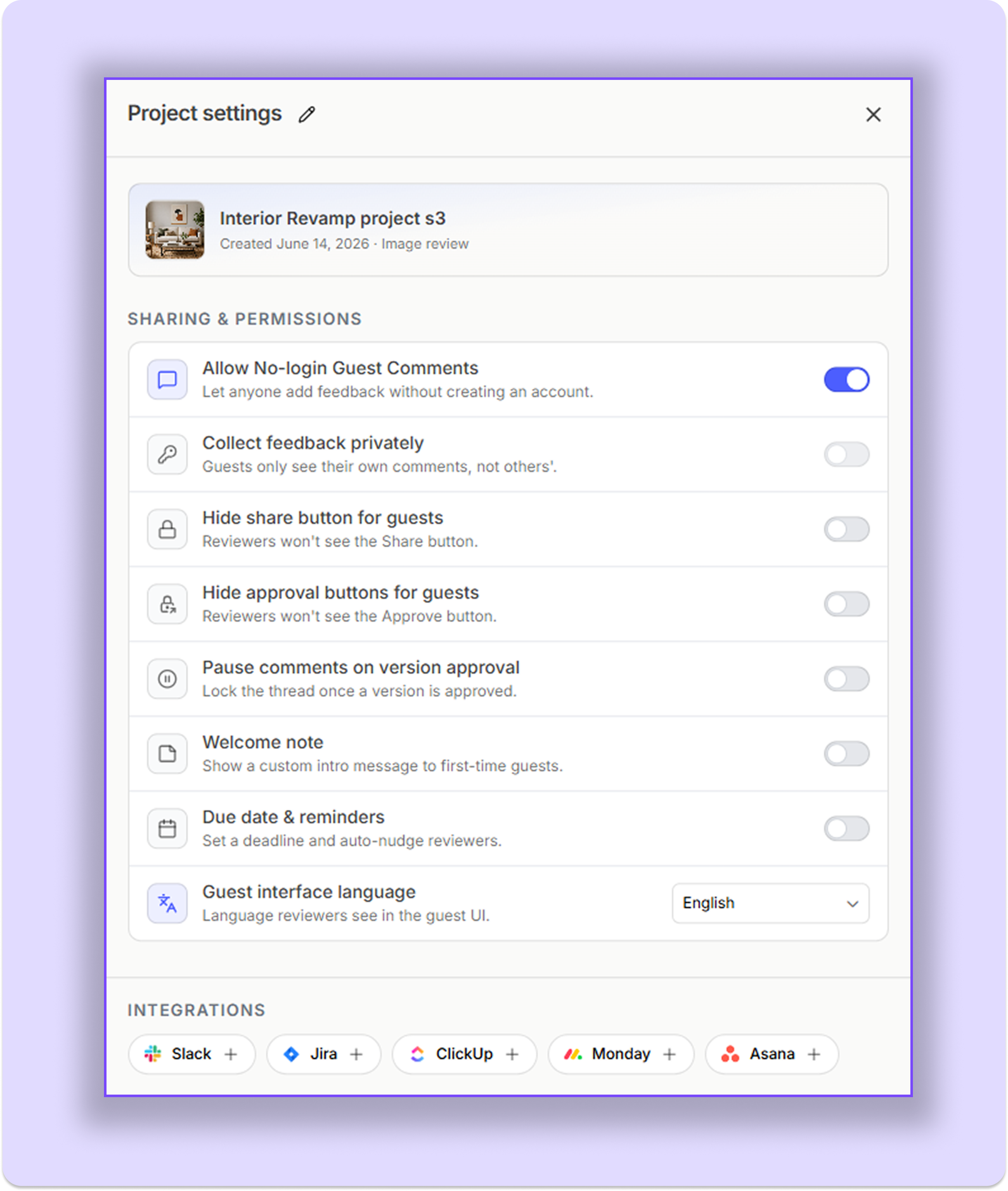
Allow No - Login Guest Comments
Allows guests and clients to add comments without logging in - they can simply enter their name and start sharing feedback. (Note: project should be in public mode for this feature to work correctly)
Collect Feedback Privately
When enabled, guests can only see their own comments and feedback. They can’t see comments added by members or other clients.
Restrict File Download
Prevents guests and clients from downloading project files.
Useful while designs or reviews are still in progress to avoid clients downloading outdated versions.
Example
Allow downloads only after the final design gets approved.
Hide Share Button For Guests
Hides the Share option from guests and clients.
This prevents external users from sharing the project link further.
Example
Only internal team members can control project sharing.
Hide Approval Button For Guests
When enabled, guests and clients won't be able to mark a project as Approved. They can still update the project status to options like Pending or Approved with Changes after entering their email address.
Pause Comments on Version Approval
Automatically locks comments once a version is marked as Approved.
Important
This only applies to the approved version, not the entire project.
Example
Once v3 is approved, guest reviewer can’t add the comments further. Although, they can still view the previous comments and changes
Welcome Note
You can add a welcome message to guide guests and clients before they start reviewing the project.
This can include a short text note, a quick video walkthrough, or both. It’s useful for explaining what kind of feedback you need, sharing instructions and guiding your clients according to your use - case.
Example
Add a short welcome video explaining which pages the client should review first.
Due Dates
Set project deadlines and automatically remind guests to leave feedback before the due date.
Instead of manually following up with reviewers, you can schedule reminder notifications such as 1 day before, 2 days before, or custom reminder dates
You can also automatically pause commenting once the deadline is reached to keep review cycles organized and avoid late feedback.
Example
Set a Friday deadline and automatically remind clients 1 day before submission.
Guest Interface Language
You can customize the language shown to guests and clients while reviewing the project.
Example
Set the guest interface language to Chinese for Chinese clients.
Integrations
Connect your preferred tools directly with the project to manage feedback more efficiently.
Example
Automatically send BugSmash to Slack or create tasks inside Jira/ClickUp
Was this helpful?
Still need help? Ask the team