Make the guest experience login-free — fix buttons that trigger the login pop-up, add an option to hide all login prompts, and fix the banner overlap
Description:
When a guest reviewer opens a shared link, they currently encounter login prompts in multiple places — even when "No Signup Required" is enabled. This adds friction and can scare off less tech-savvy or older clients, who get confused by anything that looks like a forced sign-up. It's about client literacy and keeping the guest experience clean.
There are three parts to this request:
1. Disable the buttons that trigger the login pop-up (for guests): Currently, clicking "Assign" ("Not Assigned") or "Mark as resolved" (the checkmark) opens the "Log in to stay in the loop" pop-up. The "Set Priority" button already handles this nicely — it's disabled for guests and shows a tooltip ("Set Priority – Contact project owner to update") instead.
Please apply the same behavior to Assign and Mark as resolved.
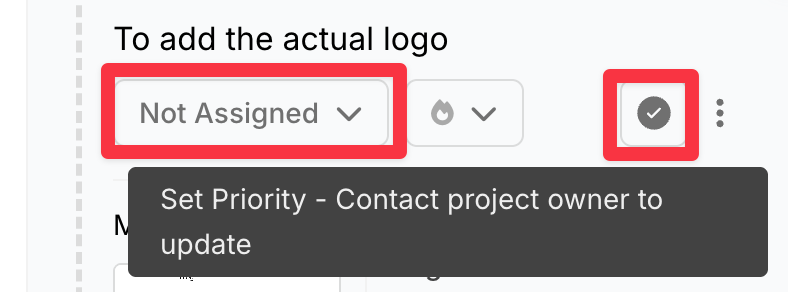
2. Add an option to fully hide login prompts from guests: Project owners should be able to toggle off, at the workspace or project level, all login pop-ups and the persistent login banner shown to guests.
The goal: open link → leave feedback, with zero login prompts anywhere. Owners who want to introduce BugSmash account features to their clients can do so on their own terms.
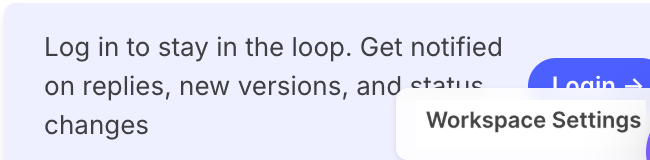
3. Fix the login banner overlap bug (for owners who keep the banner enabled): The persistent "Log in to stay in the loop" banner currently renders behind the large logo (here replaced with a screenshot of “Workspace Settings”), making it hard to read and click/dismiss. It needs proper z-index/positioning so it stays usable when banner display is enabled.
Log in to comment and vote
Comments2
John Bubliner
May 26
Thanks for the update!
John Bubliner
May 9
Please note that there is a similar issue with the ‘review’ buttons on the top which open a pop-up where it is not about sign-in but entering one emails (which is even less clear than signing-in) and is in friction with the the possibility of anonymous feedback.